
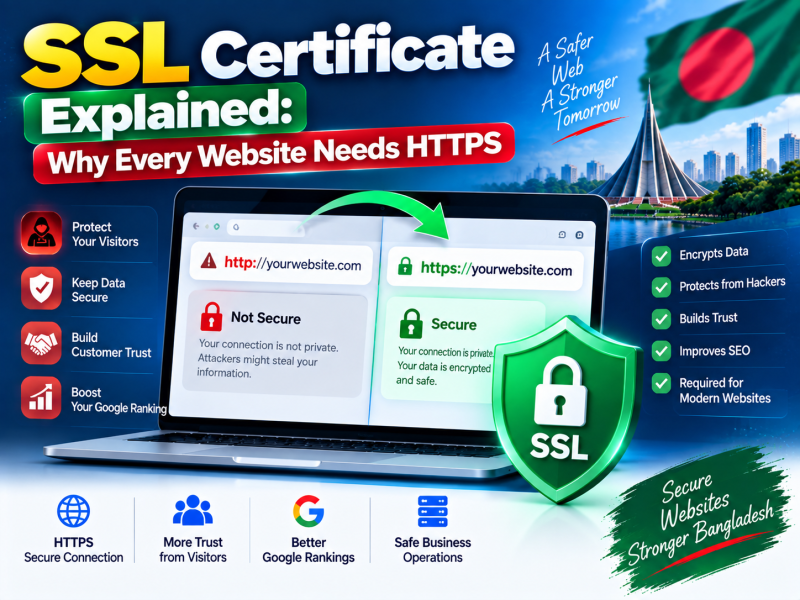
Open almost any website today and you will see a small padlock beside the address, and the address begins with https://. If a site does not have it, browsers such as Chrome warn visitors that the site is "Not secure" — a message that makes customers hesitate before filling in a form or placing an order.
That padlock comes from an SSL certificate. This guide explains in plain language what SSL is, why every website in Bangladesh needs it, the different types of certificates, how to install one, and how to fix the most common HTTPS problems.
What is an SSL certificate?
An SSL certificate is a small data file installed on your web server. It does two jobs:
- Encryption. It enables an encrypted connection between the visitor's browser and your server, so information such as passwords, phone numbers and payment details cannot be read by anyone intercepting the traffic — for example on public Wi-Fi.
- Identity. It proves to the browser that the site the visitor reached really belongs to the domain shown in the address bar, because the certificate is issued by a trusted Certificate Authority.
Technically, the modern protocol is called TLS (Transport Layer Security), which replaced the older SSL protocol. People still say "SSL certificate" out of habit; both terms mean the same thing in everyday use.
Why every website needs SSL — even without payments
- Browser warnings. Pages without HTTPS are marked "Not secure", especially pages with forms.
- Trust and conversions. Visitors are more willing to submit contact forms, register or buy on a secure site.
- Search visibility. Google has confirmed HTTPS as a ranking signal and recommends it for all sites.
- Protection of logins. Your own admin password is sent encrypted when you log in to WordPress or your software.
- Required by modern features. Payment gateways such as bKash and Nagad, many browser features and services like HTTP/2 performance improvements expect HTTPS.
- Data integrity. HTTPS prevents networks from injecting ads or altering the content of your pages in transit.
How HTTPS works, simply
When a visitor opens your site, their browser and your server perform a quick "handshake". The server presents its certificate; the browser checks that it was issued by a trusted authority, has not expired and matches the domain. They then agree on encryption keys, and all further data travels encrypted. This happens in a fraction of a second and, on modern servers, has a negligible effect on speed.
Types of SSL certificates by validation
| Type | What is verified | Best for |
|---|---|---|
| DV — Domain Validated | Only that you control the domain | Most websites, blogs, business sites, many shops |
| OV — Organisation Validated | Domain control plus the organisation's legal existence | Companies that want organisation details in the certificate |
| EV — Extended Validation | Strict verification of the organisation | Banks, large financial and enterprise sites with specific compliance needs |
All three provide the same strength of encryption. The difference is how much identity checking the Certificate Authority performs. Modern browsers display the padlock the same way for all of them, so for most businesses a DV certificate is completely sufficient.
Types of SSL certificates by coverage
- Single-domain — secures one domain, usually including the www version, such as yourcompany.com and www.yourcompany.com.
- Wildcard — secures a domain and all its first-level subdomains, such as shop.yourcompany.com, portal.yourcompany.com and mail.yourcompany.com.
- Multi-domain (SAN) — secures several different domains in one certificate, such as yourcompany.com and yourcompany.com.bd.
Free SSL or paid SSL?
Let's Encrypt and similar authorities issue free, trusted DV certificates that renew automatically every few months. Many hosting providers integrate them, so SSL is installed and renewed without any action from you.
Free certificates are suitable for the vast majority of websites. Consider a paid certificate when you need OV or EV validation, a warranty from the issuer, specific support, or when a client or tender explicitly requires a commercial certificate. The encryption strength itself is the same.
How to install SSL on your website
If your host provides automatic SSL
- Make sure your domain points to your hosting server (correct DNS records).
- Open the SSL or security section of your control panel and enable the free certificate for your domain and www subdomain.
- Wait for the certificate to be issued, then open your site with https:// to confirm the padlock.
If you install a certificate manually
- Generate a Certificate Signing Request (CSR) and private key on the server or in the control panel.
- Submit the CSR to the Certificate Authority and complete validation.
- Install the issued certificate and the intermediate (CA bundle) certificates on the server.
- Keep the private key secure and never share it.
After installation: move the whole site to HTTPS
Installing the certificate is only half the job. You also need to make sure visitors and search engines always use the secure version.
- Redirect HTTP to HTTPS with a permanent 301 redirect, so every old link lands on the secure page.
- Choose one version — with or without www — and redirect the other to it.
- Update your website settings — in WordPress, change the WordPress Address and Site Address to https.
- Update internal links and canonical tags to use https.
- Update Google Search Console by adding the https property and submitting your sitemap.
- Consider HSTS once everything works, which tells browsers to always use HTTPS for your domain.
Fixing common SSL problems
| Problem | What it means | How to fix |
|---|---|---|
| "Not secure" despite a certificate | Mixed content — some images, scripts or styles still load over http | Change those URLs to https or relative paths; use the browser console to find them |
| "Your connection is not private" | Certificate expired, invalid or for a different domain | Renew or reissue the certificate for the exact domain name |
| Works on computers but not some phones | Missing intermediate certificate | Install the full CA bundle |
| Redirect loop | Conflicting redirects, often with a proxy or CDN | Set the correct SSL mode on the CDN and remove duplicate redirect rules |
| www shows an error | Certificate does not include the www subdomain | Reissue the certificate covering both versions |
Keeping SSL healthy
- Automatic renewal — confirm that your free certificate renews automatically, and set a reminder for paid certificates before they expire.
- Keep DNS correct — automatic renewal can fail if your domain stops pointing to the server.
- Check after changes — test HTTPS after migrating hosting, adding a CDN or changing domains.
- Use online checkers — SSL testing tools show certificate details, chain problems and configuration grades.
SSL for online shops, schools and software portals
E-commerce websites
Online shops collect names, phone numbers, addresses and order details, and connect to payment gateways. HTTPS is mandatory: payment providers require it for callback URLs, and customers are unlikely to complete checkout on a page marked "Not secure". Make sure the certificate covers every domain involved, including any separate checkout or shop subdomain.
School and college portals
Student and guardian portals handle login passwords, results and fee information. Serve the entire portal over HTTPS, including result lookup pages that parents open on public or mobile networks.
Business software and admin panels
ERP, hospital and accounting systems send confidential data every time staff log in and work. Use HTTPS for all application URLs and API endpoints, and use a wildcard or multi-domain certificate if the system uses several subdomains.
SSL and your email
Certificates also protect email. Mail servers use TLS to encrypt connections when your phone or computer sends and receives messages, and between mail servers. When you configure business email on a phone, choose the SSL/TLS options and secure ports your provider recommends, so your password and messages are encrypted in transit.
Frequently asked questions
Does SSL slow down my website?
No, not noticeably on modern servers. HTTPS also enables HTTP/2, which often makes sites load faster than plain HTTP.
How long does an SSL certificate last?
Free certificates from Let's Encrypt are valid for a short period and renew automatically. Paid certificates are issued for longer periods but still need renewal before they expire.
Do I need a new certificate if I change hosting?
Usually the new host issues a fresh free certificate once your domain points to its server. For paid certificates, you can reinstall the same certificate if you have the private key.
SSL is necessary, not sufficient
A padlock means the connection is encrypted and the domain is verified. It does not mean the website itself is free from vulnerabilities or trustworthy in every other way. Keep your website software updated, use strong passwords, run malware scans and take regular backups alongside HTTPS.
Conclusion
An SSL certificate encrypts the connection between your visitors and your website, removes "Not secure" warnings, supports your search visibility and is required for payments and modern web features. For most businesses in Bangladesh, a free automatically renewing DV certificate is enough; OV, EV, wildcard and multi-domain certificates serve specific needs. After installing, redirect everything to HTTPS, fix mixed content and make sure renewal stays automatic.
Every W3 SOFT web hosting plan includes a free SSL certificate that is installed and renewed automatically. View hosting plans, register a domain, or contact us if you need help moving your website to HTTPS.
Discussion 0
No comments yet — start the conversation.