

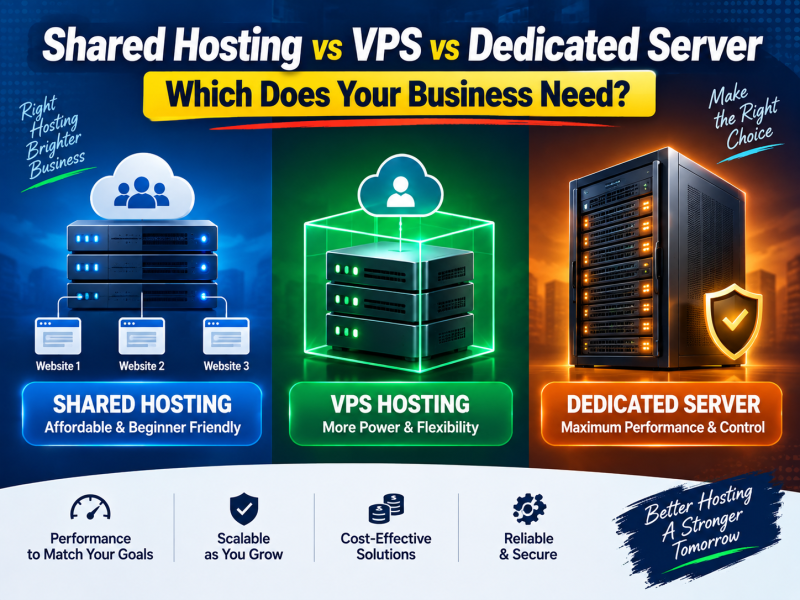
When your website is small, choosing hosting is easy: you buy a shared hosting plan and move on. But as your business grows — more visitors, an online shop, a mobile app backend, an ERP used by staff every day — you start hearing terms like VPS, cloud server and dedicated server, and the choice becomes confusing.
This article explains the three main types of hosting in plain language, compares their performance, control, security and cost, and gives clear rules for when a business in Bangladesh should move from one to the next.
A simple way to understand the difference
Think of hosting as renting space to live in:
- Shared hosting is like renting a room in a shared flat. It is affordable and the landlord handles maintenance, but you share the kitchen and bathroom. If a flatmate uses all the hot water, you notice.
- A VPS (Virtual Private Server) is like renting your own apartment in a building. You have your own locked space and guaranteed utilities, and you can arrange it however you want, but you share the building.
- A dedicated server is like renting an entire house. Everything is yours: more space, more privacy and complete freedom — and more responsibility and cost.
What is shared hosting?
With shared hosting, hundreds of websites run on one physical server. The hosting company manages the operating system, security updates, web server and control panel. You get an account with a control panel where you upload files, install WordPress, create email accounts and manage databases.
Advantages
- Lowest cost. The server cost is divided among many customers.
- No technical skills needed. The provider handles server management.
- Ready tools. One-click installers, email, SSL and backups are usually included.
Limitations
- Shared resources. CPU and memory are limited per account. A heavy website may be slowed down.
- Limited control. You cannot install custom server software or change core server settings.
- Neighbour effect. Although good hosts isolate accounts, very busy neighbours can still affect performance on crowded servers.
Best for
Company profile websites, personal and portfolio sites, blogs, small WordPress sites, school and organisation websites with moderate traffic, and small online shops just getting started.
What is a VPS?
A VPS uses virtualisation software to divide one powerful physical server into several independent virtual servers. Each VPS gets its own guaranteed CPU cores, RAM and storage, and its own operating system. From the inside, it behaves like a real server: you get root (administrator) access and can install whatever you need.
Advantages
- Guaranteed resources. Your CPU and RAM are reserved for you, so performance is consistent.
- Full control. Install Node.js, Python, Redis, custom PHP extensions, Docker or your own control panel.
- Better isolation. Other customers cannot see or affect your files and processes.
- Easy to scale. Most providers let you upgrade CPU, RAM and storage without migrating to a new server.
Limitations
- Server management. An unmanaged VPS means you are responsible for updates, security and troubleshooting. Managed VPS plans reduce this, at extra cost.
- Higher cost than shared hosting.
- Still shared hardware. The physical machine is shared, even though your slice is guaranteed.
Best for
Growing e-commerce stores, busy WordPress or news sites, Laravel and custom web applications, APIs and mobile app backends, agencies hosting many client sites, and software that needs specific server configuration.
KVM vs other virtualisation
If you compare VPS plans, prefer KVM-based VPS. KVM provides full hardware virtualisation, lets you run your own kernel and supports both Linux and Windows. Container-based technologies can be cheaper but give less isolation and flexibility.
What is a dedicated server?
A dedicated server is a physical machine rented entirely by one customer. Every CPU core, every gigabyte of RAM and all the storage are yours. There is no virtualisation layer between your applications and the hardware unless you choose to add one.
Advantages
- Maximum performance. No other customer uses the machine.
- Complete control. Choose the operating system, RAID configuration, virtualisation and security setup.
- Strong isolation. Useful for sensitive data such as patient records, financial systems and government projects.
- Predictable cost at scale. For very heavy workloads, one dedicated server can be more economical than several large VPS plans.
Limitations
- Highest cost.
- Hardware responsibility. If a disk fails, it must be replaced; good providers include hardware replacement.
- Slower to scale. Adding capacity may require upgrading or adding hardware.
- Requires expertise to manage properly, or a managed service.
Best for
Large e-commerce platforms, high-traffic news portals, hospital and ERP systems with many concurrent users, streaming and file-heavy applications, reseller and multi-VPS infrastructure, and businesses with strict data isolation requirements.
Side-by-side comparison
| Shared hosting | VPS | Dedicated server | |
|---|---|---|---|
| Resources | Shared, limited per account | Guaranteed virtual slice | Entire physical machine |
| Performance | Good for small sites | Consistent, scalable | Highest |
| Root access | No | Yes | Yes |
| Technical skill | None | Moderate (or managed) | High (or managed) |
| Security isolation | Account level | Virtual machine level | Physical level |
| Scaling | Upgrade plan | Resize in minutes | Hardware upgrade |
| Relative cost | Lowest | Medium | Highest |
Signs you have outgrown shared hosting
Moving too early wastes money; moving too late loses customers. These are the most reliable signals that it is time to move to a VPS:
- Your site slows down at busy times even after optimising images and enabling caching.
- You regularly hit resource limits — the control panel shows CPU, memory or entry-process limits being reached.
- You get "503" or "508 resource limit" errors during traffic spikes such as campaigns or sales.
- You need software shared hosting does not allow, such as Node.js services, queue workers, Redis or custom cron frequency.
- Your shop processes many orders per day and checkout speed directly affects revenue.
- You host several client websites and want them isolated from each other.
Signs a VPS is no longer enough
- You are already on a large VPS plan and still hit CPU or disk I/O limits.
- Your database is large and needs very fast local storage and lots of memory.
- You run several VPS plans whose combined cost approaches a dedicated server.
- Compliance or client contracts require physically isolated hardware.
Managed or unmanaged?
For VPS and dedicated servers, this decision matters as much as the hardware.
- Unmanaged means you get the server and full access; you handle the operating system, updates, firewall, backups and troubleshooting. It suits teams with a system administrator or experienced developers.
- Managed means the provider sets up and maintains the server, installs a control panel, applies security updates and helps when something breaks. It suits businesses that want the performance of a server without hiring server staff.
A common and sensible middle path for Bangladeshi businesses is a VPS with a control panel and an agreed support package for setup and emergencies.
Cost thinking for businesses in Bangladesh
Instead of comparing only monthly prices, compare the cost of downtime and slowness. If your online shop earns meaningful revenue on a campaign day, a few hours of an overloaded shared server can cost more than a year of VPS fees. On the other hand, a five-page company website gains nothing from a dedicated server.
A practical path most businesses follow is:
- Start on quality shared hosting.
- Optimise — images, caching, a lightweight theme — before upgrading.
- Move to a VPS when the signs above appear consistently.
- Move to a dedicated server when a large VPS is no longer enough or isolation is required.
Real-world examples
A school website with online results
For most of the year, a school website receives modest traffic from parents and students checking notices. On result day, thousands of people open it at the same moment. Shared hosting handles the normal days well, but the result day spike can overwhelm it. A sensible approach is a small VPS for the result system, or publishing results through a separate, lightweight page with caching.
A growing Facebook shop moving to its own website
A clothing brand that sells mainly through Facebook and launches a WooCommerce store usually starts perfectly well on shared hosting. When boosted campaigns start sending hundreds of visitors at once and orders arrive every few minutes, checkout speed begins to matter. That is the moment to move the store to a VPS with more memory for the database.
A hospital or diagnostic centre running management software
Hospital software is used continuously by reception, lab and accounts staff, and it stores sensitive patient data. It should never run on shared hosting. A VPS is suitable for a single facility; a hospital group with several branches, large report archives and many simultaneous users should consider a dedicated server or a well-sized VPS with strict backups.
How to migrate without downtime
- Take a full backup of files and databases.
- Set up the new server and restore the website there.
- Test it using a temporary URL or by editing your computer's hosts file.
- Lower your DNS TTL a day before the move so changes spread faster.
- Update DNS records to point to the new server during a quiet period.
- Keep the old hosting active for a few days and check that email and forms work.
Many providers, including W3 SOFT, can handle this migration for you.
Conclusion
Shared hosting, VPS and dedicated servers are not good or bad — they are tools for different stages of a business. Choose shared hosting for simple, affordable websites; a VPS for growing sites and applications that need guaranteed resources and control; and a dedicated server for large, sensitive or resource-hungry systems.
W3 SOFT offers all three, so you can start small and grow without changing providers. Explore web hosting, VPS servers and dedicated servers, or contact our team for a recommendation based on your website's real traffic.



Discussion 0
No comments yet — start the conversation.