

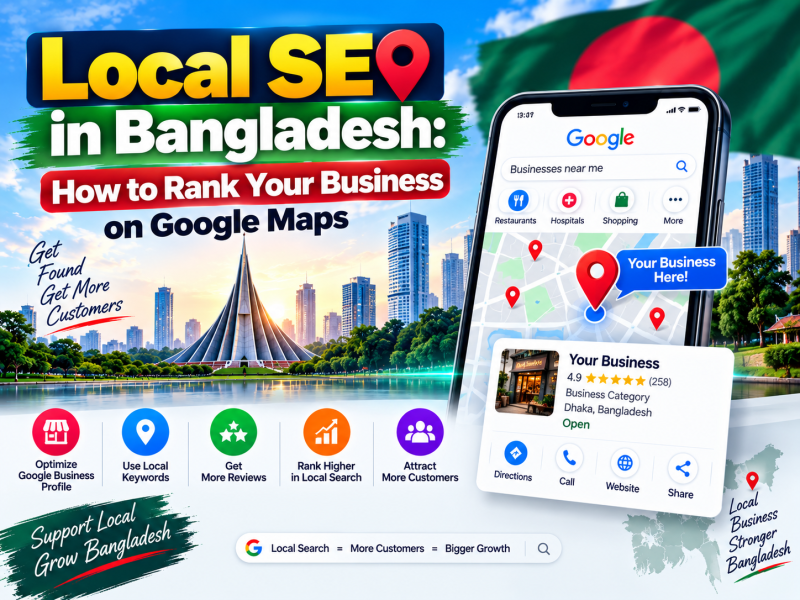
When someone in Khulna searches "diagnostic centre near me", or someone in Dhaka searches "laptop repair Mirpur", Google shows a map with three businesses before any regular website results. That map section — often called the local pack — is where many customers make their decision. Being there can bring phone calls, directions requests and walk-in customers without paying for ads.
This is local SEO: making your business visible in searches with local intent. This guide explains how local search works and shows, step by step, how a business in Bangladesh can set up and grow its presence using a Google Business Profile and its own website.
How Google decides which local businesses to show
Google describes three main factors for local results:
- Relevance — how well your business profile matches what the person searched for.
- Distance — how close your business is to the searcher or to the location mentioned in the search.
- Prominence — how well known your business is, based on reviews, links, articles, directory listings and your overall presence online.
You cannot change your distance from a customer, but you can strongly influence relevance and prominence. That is what the rest of this guide is about.
Step 1: Create or claim your Google Business Profile
- Go to Google Business Profile (business.google.com) and sign in with a Google account the business owns — not a staff member's personal account.
- Search for your business name. If a profile already exists, request ownership; otherwise create a new one.
- Choose whether customers visit your location, whether you serve customers at their location, or both.
- Enter your address precisely and place the map pin on the correct building.
- Complete verification. Google may use a phone call, text, email, video recording or postcard, depending on the business.
Until the profile is verified, many of your edits will not appear publicly, so complete verification as soon as possible.
Step 2: Fill in every section accurately
Business name
Use your real business name exactly as it appears on your signboard, trade licence and website. Adding keywords or locations to the name ("Best IT Company Khulna Cheap Hosting") violates Google's guidelines and can lead to suspension.
Categories
Your primary category is one of the strongest relevance signals. Choose the most specific category that describes your main business, such as "Diagnostic center", "Software company" or "Clothing store". Add a few accurate secondary categories for other services you genuinely offer.
Address, service area and hours
- Use a consistent address format everywhere.
- Set regular opening hours, and add special hours for Eid, Pohela Boishakh, Victory Day and other holidays so customers do not arrive at a closed door.
- If you visit customers, define your service areas by district or city.
Phone number and website
Add a local phone number that is answered during business hours and link to the most relevant page of your website. A number that rings unanswered sends customers straight to competitors.
Products and services
List your main services or products with short descriptions and, where appropriate, prices. This helps Google understand what you offer and helps customers decide.
Business description
Write a clear description of who you serve, what you offer and what makes you different. Mention the areas you serve naturally. Avoid links, promotional capital letters and keyword stuffing.
Step 3: Add real photos and keep adding them
Profiles with good photos look more trustworthy and receive more engagement.
- Add your logo and a cover photo.
- Add exterior photos so people recognise the building and entrance.
- Add interior photos of your office, shop, reception or lab.
- Add photos of your team, products and completed work.
- Upload new photos every month. Use real photos, not stock images.
Step 4: Build reviews the right way
Reviews influence both rankings and customer decisions. Many customers in Bangladesh read reviews carefully before visiting a clinic, restaurant or service provider.
- Ask every satisfied customer. The best moment is right after a successful service. Send a direct review link by SMS, WhatsApp or email.
- Make it easy. Put a QR code linking to your review page at your reception counter or on invoices.
- Reply to every review — thank positive reviewers and respond calmly and helpfully to negative ones. Future customers read your replies.
- Never buy fake reviews or offer rewards in exchange for positive ratings. Google removes them and can penalise the profile.
- Accept reviews in Bangla and English. Both are valuable.
Step 5: Use Google Business Profile posts and Q&A
- Publish posts about offers, new services, events and holiday hours. Posts keep your profile active and give customers a reason to contact you.
- Answer questions in the Q&A section. You can also add common questions yourself — such as parking, payment methods or home sample collection — and answer them.
- Turn on messaging if your team can reply quickly.
Step 6: Make your website support your local SEO
Your Google Business Profile and your website work together. Google cross-checks information between them.
Consistent NAP
Your Name, Address and Phone number (NAP) should be identical on your website, Google Business Profile, Facebook page and directory listings. Small differences — like "Rd" versus "Road" or an old phone number — create confusion.
Location pages and local content
- Add your full address, phone number and an embedded Google Map on your contact page.
- If you have several branches, create a separate page for each branch with its own address, phone, hours and photos.
- Mention your city and the areas you serve naturally in page titles and content, such as "Software Company in Khulna".
- Publish helpful local content, such as guides relevant to customers in your city.
Structured data
Add LocalBusiness schema markup to your website. It tells search engines your business type, address, phone, opening hours and area served in a machine-readable format.
Mobile experience
Most local searches happen on phones. Make sure your website loads quickly on mobile data, that the phone number is tappable and that directions are one tap away.
Step 7: Build local citations and links
Citations are mentions of your business name, address and phone on other websites. They strengthen prominence and confirm your details.
- Industry associations and chambers of commerce you belong to, such as BASIS or e-CAB member directories for IT companies.
- Reputable Bangladeshi business directories and marketplaces relevant to your industry.
- Your Facebook page, LinkedIn company page and other active social profiles.
- Local news coverage, sponsorships of local events and partnerships with other businesses.
Focus on quality and accuracy rather than the number of listings.
Step 8: Measure what is working
- Google Business Profile performance shows searches, calls, direction requests and website clicks from your profile.
- Google Search Console shows which search terms bring visitors to your website.
- Track calls and enquiries — ask new customers how they found you.
Local SEO tips by business type
Hospitals, clinics and diagnostic centres
Choose precise categories such as "Diagnostic center" or "Hospital", list departments and tests as services, keep emergency and doctor chamber hours accurate, and add photos of the reception, lab and building entrance. Patients often search for specific tests or specialists, so publish pages for important services on your website as well.
Restaurants and cafés
Add your menu, food photos, price range and delivery or dine-in options. Update special hours during Ramadan and Eid, and respond to reviews about food and service quickly.
Schools, coaching centres and training institutes
Publish admission periods as posts, add photos of classrooms and facilities, list courses as services and make sure parents can call or message during office hours.
Shops and showrooms
Add product categories, mark whether you offer delivery, keep holiday hours updated and encourage buyers to leave reviews mentioning what they bought.
Service businesses without a public office
Electricians, AC repair services, cleaning companies and IT support providers can hide their address and set service areas instead. Focus on reviews, photos of completed work and fast responses to messages.
How long does local SEO take?
A newly verified and complete profile can start appearing for your business name within days, but ranking for competitive searches like "diagnostic centre in Khulna" usually takes consistent work over several months. Reviews, photos, posts, accurate information and a helpful website all accumulate. Businesses that keep their profile active every week typically outperform those that set it up once and forget it.
Common local SEO mistakes
- Keyword-stuffed business names.
- Different phone numbers or addresses on different platforms.
- A profile owned by a former employee or agency's account.
- Outdated opening hours, especially during holidays.
- Ignoring negative reviews instead of responding.
- Creating multiple profiles for the same location.
Conclusion
Local SEO gives businesses in Bangladesh a practical way to reach nearby customers at the exact moment they are searching. Claim and verify your Google Business Profile, complete every section accurately, add real photos, collect and answer genuine reviews, keep your details consistent everywhere and support it all with a fast, locally relevant website. Results build over weeks and months, and the effort compounds.
W3 SOFT builds SEO-ready websites with local business structured data and helps businesses improve their online presence. Contact our team in Khulna or explore our website design and development services.
Discussion 0
No comments yet — start the conversation.